Is AI Right for Your Phone System? Here’s How to Tell
Image Generated by AI
AI might sounds complicated. What it actually does isn’t.
In Part 1, we looked at how much valuable business information can disappear the moment a call ends.
AI isn’t about replacing conversations; it’s about capturing what happened during them, making that information easier to find, and helping your team act on it. But is it right for your business?
The reality behind AI hesitation
People often imagine expensive overhauls, clunky software or technology that gets in the way.
Modern AI call intelligence can work quietly in the background, enhancing the tools and systems your team already uses.
Rather than asking “Do we need AI?”, a better question might be:
“Where are we losing time, information or context?”
What are other businesses doing?
ONS’s Business Insights and Conditions Survey (July 2026) found that nearly three in 10 UK businesses reported using at least one type of AI technology in June 2026, up 8% from a year earlier rising to around half of businesses with 250 or more employees.
Yes, AI adoption is growing, but that doesn’t mean every business needs to rush out and add AI to its phone system.
Note: Example screen only. Image Generated by AI
Let’s look at why you might be interested in AOI for your business…
1. Eliminating call admin
After a call, someone still has to write notes, update the CRM and flag follow‑ups. AI can automate much of this by generating transcripts, summaries and action points.
Platforms like COTU RAMP turn conversations into searchable records. Your team spends less time documenting conversations and more time acting on them.
2. Spotting invisible trends
One customer mentioning a competitor is an anecdote. Twenty customers doing it is a trend.
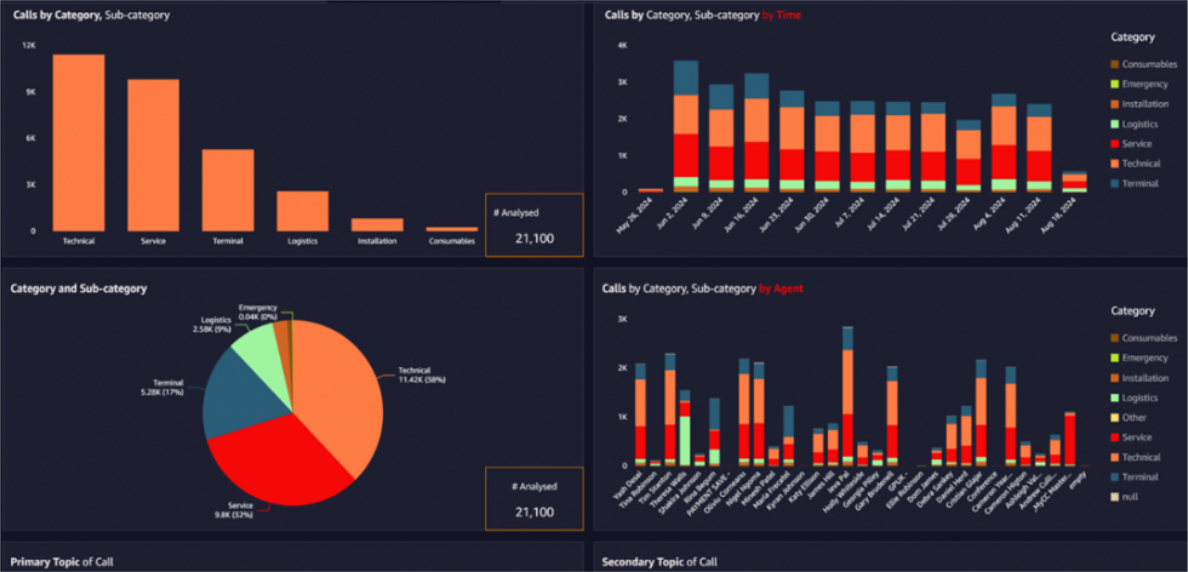
AI can analyse calls at scale to highlight recurring concerns, shifts in sentiment and emerging opportunities. COTU CX/EX AutoInsights, for example, can surface these patterns without managers having to listen to hundreds of hours of recordings.
This changes the role of call recording from simply “something we keep” to “something we can learn from.”
3. Targeted coaching
Call recording is standard practice, but managers rarely have time to review hours of audio.
Speech analytics can help pinpoint the moments that matter – how an objection was handled, why a prospect hesitated, what sealed the deal or where a conversation could have gone differently.
Instead of relying on random call sampling, managers can focus coaching on specific conversations, behaviours and opportunities for improvement.
Note: Example CX/EX screen. Image source COTU.
Do you actually need it?
You shouldn’t adopt AI just because it’s available. Start with the problem:
Is your team spending hours on manual CRM entry?
Do crucial details get lost when someone is unavailable, off sick or on holiday?
Are you storing call recordings that nobody ever listens to?
Would it be useful to understand what customers are actually saying across hundreds or thousands of calls?
Could your managers make better decisions with more insight from everyday conversations?
If one or more of these sound familiar, AI may be worth exploring but the right solution will depend on what you’re trying to achieve.
And you may not need to replace your existing phone system. Depending on your setup, AI capabilities can often be added to or integrated with the technology you already have.
Image generated by AI.
Next steps
Before evaluating products, it’s worth taking a step back and looking at what’s happening in your calls today.
Start with your own conversations:
What information currently disappears after a call?
What tasks are still handled manually?
What would you do differently with instant access to conversation data?
There are a lot of AI products on the market – all promising different things, all sounding similar, and all claiming to be “the best”. It can be genuinely tricky to know what you actually need or which options make sense for your setup.
The best place to start often isn’t with the technology. It’s with the conversations. Understand what you’re currently missing, what’s taking up your team’s time and what you’d actually like to improve. From there, you can work out whether AI is the right answer and what kind of solution makes sense for your business.
At Evoke Telecom, we can help you explore where AI could add value and what options might work for your business including possibilities you may not have considered. Ready to chat? We’re ready to help.